Looking for the best job management software for your trade or field service business? These tools streamline everything from quoting and scheduling to invoicing and team communication. Here’s a quick overview of our top picks for trades and field service businesses in 2025.
Top Picks at a Glance
- Workever: Best for growing field-service teams of 5–50 people that need jobs, schedules, sites and invoicing in one system.
- Jobber: Best for home service professionals
- ServiceM8: Great for smaller teams looking for simplicity and a mobile-first interface.
- Tradify: Ideal for small to medium-sized businesses, offering seamless integration with QuickBooks and Xero.
- Fergus: For trades businesses of any size
- Commusoft: Perfect for field service businesses, offers robust customer management features.
What Is Job Management Software and Who Needs It?
Job management software is a digital platform that helps service-based businesses manage their daily operations. It includes tools for quoting, scheduling, dispatching, job tracking, invoicing and customer communication. It allows you to manage your business from anywhere with one app.
If you own or manage a field service business, then you would’ve experienced first-hand the issues you and your staff face daily. From juggling paper job sheets, dealing with missed appointments or spending too much time catching up on invoices, job management software can help. Whether you’re an electrician, plumber, cleaner or a sole trader in another trade, job management software can improve the day-to-day running of your business.
These platforms eliminate admin overload, reduce paperwork, improve field-team coordination and get you paid faster. With the right software, tradespeople and field service businesses can save time, grow revenue and deliver better customer service.
In-Depth Reviews: Best Job Management Software Solutions
Firstly, here’s a quick glance at our top picks.
Software | Best For | Key Features | Price Range | Free Trial | Integrations |
Workever | Growing field-service teams of 5–50 people | Engineer location tracking Site job history | £29-£39 per user per month | 14 days | Quickbooks Xero Stripe |
Jobber | Small to mid-sized teams/businesses | -Customer service portal -Automated reminders | $25-$378 a month | 14 days | Quickbooks Xero |
ServiceM8 | Sole traders and small teams/businesses | -Drag and Drop dispatch -Professional quotes and invoicing | Free or £25 to £269 a month | 14 days | Quickbooks Xero Amazon Web Services |
Tradify | Small to mid-sized businesses | -Instant quoting and invoicing -Scheduling with Google Calendar sync | £34-£44 per user per month | 14 days | Quickbooks Xero Stripe |
Fergus | Trade businesses of all sizes | -Visual scheduling and real-time job tracking -Business and Job reporting | £35-£45 a month | 14 days | Quickbooks Xero MYOB |
Commusoft | Mid to large businesses | -Drag and Drop scheduling -Mobile app with offline job management | Custom tiered plans | 14 days | Quickbooks Xero Sage |
Now let’s get into it.
1. Workever
Best For: Growing service and maintenance teams of 5–50 people that have outgrown spreadsheets, diaries and WhatsApp for managing jobs.
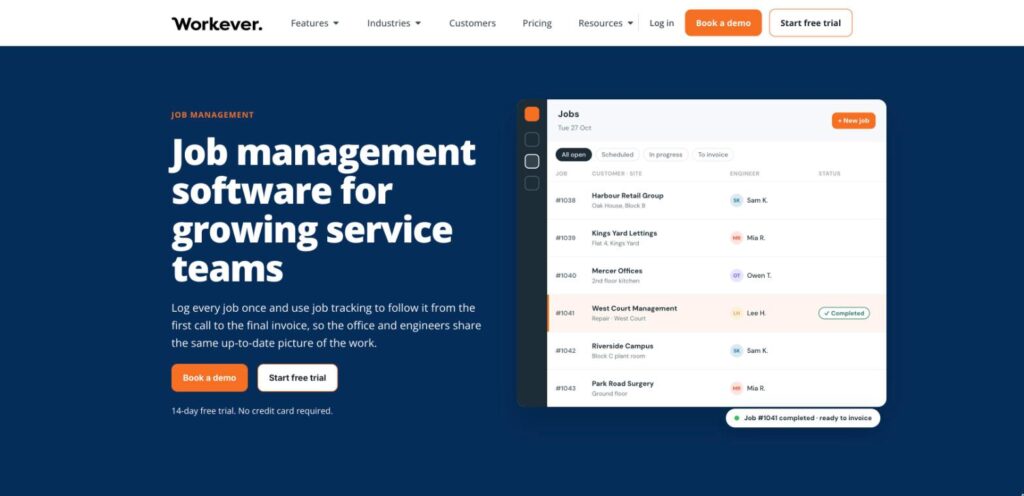
Workever is job management software for growing service businesses with a field team and an office to coordinate. Every job sits against a customer and site, so the office can see each job’s status, engineers can check a site’s past jobs from the mobile app, and completed work moves to invoice without re-keying. It suits electrical contractors, property and facilities maintenance firms, and HVAC and plumbing & heating teams.
Key Features:
- Quotes, scheduling and invoicing in one system, with recurring jobs for planned work
- Customer and multi-site records with full site job history
- iOS and Android app with job details, photos and customer signatures
- Engineer locations on the scheduler map
- Forms that work offline, plus timesheets and expenses (Ultimate plan)
- Xero, QuickBooks and Stripe; Sage 50 and Sage 200 invoice export
Industries / Key Users: Electrical contractors, property, facilities and building maintenance firms and specialist contractors, plus HVAC and plumbing & heating teams.
Markets: A strong presence in the UK, but also used by trade businesses in other countries such as Australia, Canada, Ireland, New Zealand, South Africa and the USA.
Pricing:
- Base Plan: £29 per user/month, includes job management, scheduling, quotes, invoices, fieldworker mobile apps, and accounting integrations
- Ultimate Plan: £39 per user/month, adds form builder, stock and asset management, service contracts, customer self‑service portal, timesheets & expenses
- 14-day free trial with no credit card required
Strengths:
- Office and field work from the same up-to-date job and site information
- Paperwork moves into one system, from quote to job report to invoice
- Room to grow into forms, assets and service contracts on Ultimate without switching systems
2. Jobber
Best For: Perfect for small to mid‑sized home service teams that want a streamlined, all‑in‑one platform.

Jobber is a cloud‑based job management system designed for service professionals such as HVAC, plumbing, electrical, landscaping and cleaning businesses. It distinguishes itself through easy online booking, automated client communication, AI‑powered tools like Copilot and Receptionist and mobile-centred scheduling and dispatch workflows.
Key Features:
- Quoting, scheduling, invoicing and payments are consolidated in one platform
- Customer self‑service portal with 24/7 access and online booking
- Automated reminders, follow‑ups and two‑way messaging
- Visual dashboards and reporting tools to monitor jobs, team performance, and finances
Industries / Key Users: Used across more than 50 home service industries, including HVAC, plumbing, lawn care, pest control, cleaning, electrical contracting, roofing and more.
Markets: Over 300,000 home‑service professionals use Jobber in more than 60 countries worldwide.
Pricing:
- For individuals: $25-$126 a month
- For teams: $109-$378 a month
- A 14‑day free trial is available
Pros:
- Extremely user-friendly with quick onboarding, making it ideal for non‑technical users
- Strong automation and communication flow
- AI features offer forward‑thinking value-added support
Cons:
- Limited customisation and scalability for more complex or unique workflows
- Higher pricing compared to simpler alternatives, with key features locked behind upper tiers
3. ServiceM8
Best For: Sole traders, micro‑teams and small field trade businesses looking for a mobile‑centric, job‑based management tool.
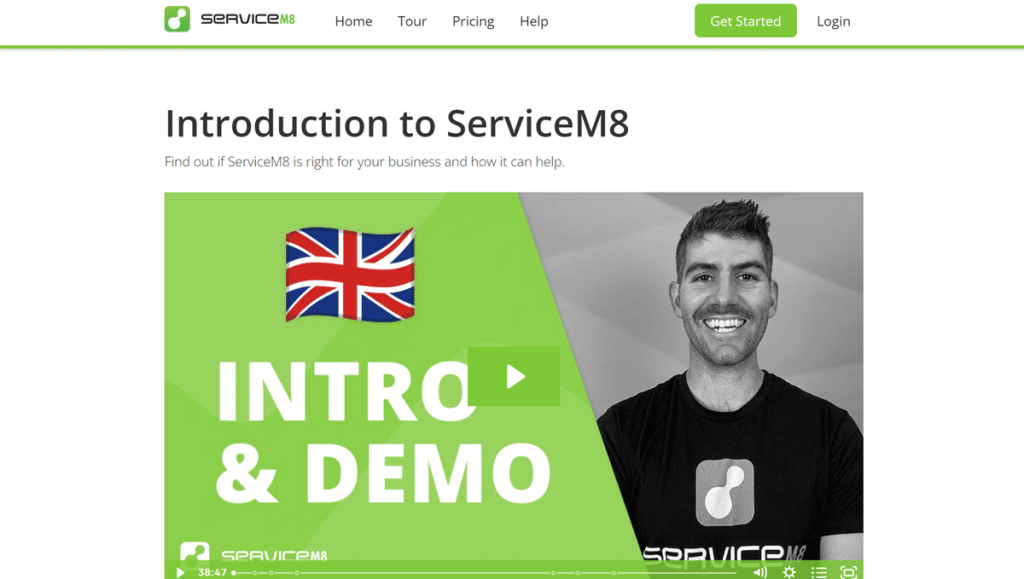
ServiceM8 is a cloud‑based platform tailored to small trade and home‑service contractors. It streamlines workflows from quoting to invoicing via its iOS app, appealing to users who prioritise simplicity and ease of use. Its unique value lies in its job‑based pricing model with unlimited users, making it cost‑effective and scalable for high‑volume or seasonal operations.
Key Features:
- Dispatch jobs via drag‑and‑drop and access job history with photos, notes and forms
- Highly optimised iOS app, with a lighter Android Lite version for basic use
- Professional templates for quotes and invoices,
- Live dispatch map for technician location tracking
Industries / Key Users: Trades and small service sectors, including electrical, plumbing, HVAC, landscaping, pest control, locksmiths, cleaning, appliance repair, pool services, property services, and more.
Markets: Globally available to be used in any country and particularly popular within the UK market.
Pricing:
- Free for 1 user with 30 jobs or fewer a month
- For multiple users, prices range from £25-£269 a month, depending on the number of jobs
- Free 14-day trial with no credit card needed
Pros:
- Very easy to use and set up, making it ideal for non‑technical users
- Job‑based pricing with unlimited users delivers excellent value
- Strong mobile experience, especially on iOS, with robust offline
Cons:
- Scheduling lacks advanced features like auto‑scheduling and shift swaps
- Lacks expense management
4. Tradify
Best For: Ideal for small to mid‑sized trade and service businesses.

Tradify is an all-in-one job management platform that streamlines business admin from quotes and estimates to invoicing, scheduling and time tracking. Its standout features benefit trade and service businesses, including fast quoting, such as price lists, strong accounting integrations and a highly accessible user experience. It balances simplicity with a comprehensive toolkit tailored for trades professionals.
Key Features:
- Instant quoting and invoicing with reusable templates
- Scheduling with Google Calendar sync
- Clear Job tracking with notes, photos, documents and client communication logs
- Integrations with Xero, QuickBooks and Stripe
Industries / Key Users: Widely used across trades and field service sectors: electrical, plumbing, gas engineering, HVAC, property maintenance, building, landscaping, and more.
Markets: Globally available with a strong presence in the UK, NZ, Australia and the USA.
Pricing:
- Lite: £34 per user/month, which includes job management, scheduling, quoting, payments, and accounting software sync
- Pro: £37 per user/month, which includes custom branding, inquiry form, communication history and job templates
- Plus: £44 per user/month, which includes purchase orders, bulk invoicing, kit bundles, staff logs and reports
- Custom: Tailored plan for larger teams available on request
- 14-day free trial available with no credit card required
Pros:
- Easy to use with fast onboarding
- Efficient quoting and invoicing workflow, and seamless accounting sync
- Strong customer support, including training and real-time assistance
Cons:
- Inventory control is basic
- Pricing may be higher than simpler alternatives, especially as the user count grows
5. Fergus
Best For: Trade businesses of all sizes and at any stage.

Fergus is a cloud-based job management tool. It stands out by automating supplier invoice integration, offering a centralised job card workflow and delivering visual scheduling dashboards, all of which dramatically reduce paperwork and streamline operations for trade businesses.
Key Features:
- Visual scheduling and real-time job tracking via job cards
- Mobile app support (iOS & Android)
- Business, job and employee reporting
- Accounting and payment integrations
Industries / Key Users: Trades and field services across plumbing, electrical, building, HVAC, roofing, and other field services.
Markets: Used globally by 20,000 contractors with strong uptake in Australia, New Zealand and the UK.
Pricing:
- £35-£45 a month for small teams
- Custom pricing for businesses with more than 10 members in their team
- Free 14-day trial with no credit card required
Pros:
- Deep supplier integration helps automate cost tracking and invoicing with accuracy
- Mobile-friendly job cards and a visual status board create a clear workflow and visibility
- Easy to use, with training support and responsive customer service
Cons:
- Limited search functionality for low-tier users
- Difficulty editing quotes once it has been published
6. Commusoft
Best For: Mid‑to‑large trade and service businesses.

Commusoft is a comprehensive cloud‑based job management system built for tradespeople and service businesses in industries such as plumbing, HVAC and facilities maintenance. It stands out for its strong automation features, real‑time job costing, asset tracking, self‑service portals and integrated dispatching tools.
Key Features:
- Drag-and-drop calendar for optimal scheduling
- Service contracts and automation, including recurring reminders, SLA monitoring and auto-renewals
- Mobile app with offline job management
- Reporting and dashboards offering visibility into productivity, revenue and asset performance
Industries / Key Users: Commusoft serves a wide range of trades, including plumbing, HVAC, refrigeration, facility maintenance, electrical services and more.
Markets: Commusoft is used worldwide with a strong customer presence in Trusted by teams in the UK, US and Canada.
Pricing: Commusoft offers tiered plans based on requirements, plus an onboarding fee.
Pros:
- Wide-ranging automation and customisation
- Real-time job costing and parts visibility to help streamline billing
- Excellent support and ease with onboarding
Cons:
- Costing isn’t clear, so it could be more expensive than other job management software available.
- Opting for a wide feature set can mean that onboarding is a longer process
Quick Buyer’s Guide: How to Choose the Right Solution
Features to Look For
Before committing to any job management software, you want to ensure yours includes:
- Job scheduling and calendar views
- Mobile access for field teams
- Quoting and invoicing tools
- Client CRM and communication
- Real-time updates and syncing
- Reporting and financial tracking
- Accounting integrations
Buying based on business size
- Sole traders/entrepreneurs: Sole traders and small contractors typically need simple, mobile-first tools with affordable entry pricing and easy setup. Platforms like ServiceM8, with its job-based pricing, are a good fit.
- Small teams (2 to 10 staff): Small trade and service teams benefit from solutions that balance usability with scheduling, quoting, invoicing and accounting integrations. Tradify is a good fit at this stage. Workever suits teams at the top of this range that are adding engineers, sites and repeat work, and keeps scaling to around 50 people.
- Larger businesses (10+ staff): Larger teams often require more advanced scheduling, automation, asset tracking and reporting to handle higher volumes and complex workflows. Jobber and Fergus provide robust job management at scale, while Commusoft is especially suited for mid-to-large businesses that need automation, service contracts, and custom workflows.
Final Thoughts & Next Steps
Whatever stage your business is in, Job management software can be a game-changer for trades and service businesses of all sizes. From reducing paperwork and streamlining quotes, enhancing scheduling and instant invoicing, to improving communication with customers and providing real-time visibility of your team, these platforms help save time and boost professionalism. Job management software takes care of the admin tasks and allows you and your team members to focus on the important jobs.
If you’re still unsure whether you or your team will benefit, then make the most of the free demos and free trials on offer. Most of the leading solutions offer a free trial without a credit card required, so you can test features and find the best fit for your business before committing.
Running more jobs, sites and engineers than your current tools can handle? Try Workever free for 14 days.
Frequently Asked Questions
Is job management software worth it for small businesses?
Yes. Even small businesses and sole traders benefit from reduced admin and improved customer communication. A good job management platform can pay for itself by saving hours each week and preventing costly mistakes.
What’s the easiest job management software to use?
ServiceM8 is among the simplest options for a solo operator. Workever suits teams that need more structure: engineers get a clear mobile job list, and the office keeps scheduling, site history and invoicing in one place.
Does job management software help reduce admin time?
Absolutely. By automating tasks like quoting, invoicing, scheduling, reminders and payment collection, job management software cuts down on manual paperwork and data entry. This frees up business owners and staff to focus more on delivering services and growing the business.